|
Q: How
does Cloud
Controller licensing
work?
A: Meraki access
points use the Cloud
Controller for
centralized
management and
control. Cloud
Controllers are
licensed on a per
node, per year
basis. Each account
is licensed for a
certain number of
access points.
Q: How
much does a Cloud
Controller license
cost?
A: An Enterprise
license is $150.00
per node per year.
Discounts are
available for
multi-year licenses.
A 3-year license is
$300.00 and a
five-year license id
$450.00.
Q: How do
I buy a Cloud
Controller license?
A: You can buy a
license directly
through an
authorized Meraki
partner.
Q: What
happens when my
license runs out?
A: You can
purchase a renewal
through an
authorized Meraki
partner or from
Meraki directly. If
you chose not to
renew, you will no
longer have access
to Meraki's Cloud
Controller, which
will cause your
network to stop
functioning.
Q: Do I
have to buy more
licenses every time
I buy new hardware?
A: Not
necessarily.
Licenses are sold
separately from the
hardware.
Q: What
happens if I add APs
in the middle of my
license term? Can I
buy a pro-rated
license?
A: Meraki sells
one year, three
year, and five year
licenses, but does
not sell pro-rated
licenses. When you
add a license to an
existing account,
the amount of extra
time in your account
is calculated and
the renewal date for
all your APs is
extended
accordingly. In this
way an account only
has a single renewal
date, avoiding the
confusion associated
with multiple
renewal dates and
co-termination.
Q: I
don't understand how
the pro-ration
calculation works.
Please explain.
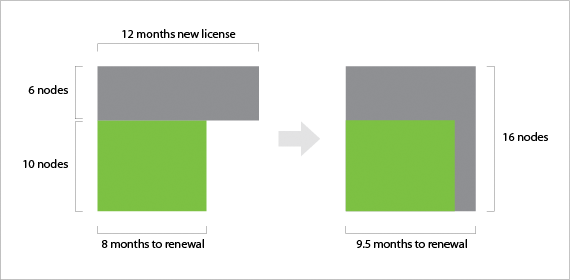
A: If you add a
license to an
existing network in
the middle of the
license period,
Meraki gives you
credit on your new
license by extending
your renewal date.
Here's an example.
Let's say you
originally purchased
a 10 AP, 1 year
license. 4 months
into the license
term you decide to
add a 6 AP, 1 year
license. You have
extra credit of
4*6=24 AP-months. We
automatically apply
those 24 AP-months
for your new 16 AP
network. This gives
you an additional 24
/ 16 = 1.5 months.
The diagram below
illustrates this
example.
|