802.3at PoE
Injector
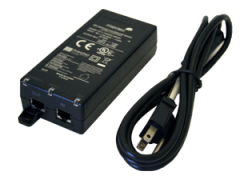 The
Cisco Meraki PoE
Injector allows
delivery of both
data and power to a
Meraki access point
over a single
Ethernet cable,
allowing deployment
of devices exactly
where they are
needed to provide
the best wireless
coverage and at much
lower installation
cost. This PoE
injector is
specifically
designed to meet the
power needs of Cisco
Meraki
802.3at-compatible
devices. Check the
access point
specifications to
ensure
compatibility. The
Cisco Meraki PoE
Injector allows
delivery of both
data and power to a
Meraki access point
over a single
Ethernet cable,
allowing deployment
of devices exactly
where they are
needed to provide
the best wireless
coverage and at much
lower installation
cost. This PoE
injector is
specifically
designed to meet the
power needs of Cisco
Meraki
802.3at-compatible
devices. Check the
access point
specifications to
ensure
compatibility.
Easy
Installation
Use Power
Over Ethernet to
supply power (and
optionally data) to
Cisco Meraki 802.3at
compatible devices.
Ethernet cable is
inexpensive and easy
to install. Simply
plug the AC adapter
into the side of the
Cisco Meraki PoE
injector, then plug
Ethernet cable into
the PoE port and
route that cable to
your
802.3at-compatible
device. To add a
wired data
connection, plug the
data Ethernet cable
into the LAN port on
the Meraki PoE
Injector.
|
Power
-
Input
Voltage:
100 to
240 VAC
-
Input Current: 0.8A maximum
- AC
Input
Frequency:
50-60 Hz
-
Maximum
Output
Power:
30 W
-
Powered
device
can be
up to
100m
away
from
power
injector
Data
-
Compatible
with
10/100/1000
Mbit/s
Ethernet,
full
duplex
Environmental
-
Operating
Temperature:
(32 to
104°F (0
to 40°C))
-
Storage
Temperature:
(-4 to
158°F
(-20 to
70°C))
-
Operating
Humidity:
5 to 93%
Additional
Features
Physical
Dimensions
-
6.3” x
2.1” x
1.4”
(160 mm
x 52.5 mm
x 35.5 mm)
-
Weight:
0.46 lb
(210 g)
|
|
Mounting
-
Mounts
to walls
(anchors
and
screws
not
included)
Compatibility
-
Complies
with
802.3at
standard
- Backward compatibility with 802.3af MR-series access points
LED
Indicators
-
Input
Power
-
Fault
-
Detected/connected
to valid
802.3at
load
Regulatory
- USA:
FCC Part
15 Class
B
- EU:
EN55022
Class B
Warranty
- 1
year
hardware
warranty
included
Ordering
Information
-
MA-INJ-4-US
802.3at
Power
over
Ethernet
Injector
(US
plug)
|
Multigigabit
802.3at PoE Injector
 The
Cisco Meraki
Multigigabit PoE
Injector allows
delivery of both
data and power to a
Meraki access point
over a single
Ethernet cable,
allowing deployment
of devices exactly
where they are
needed to provide
the best wireless
coverage and at much
lower installation
cost. This PoE
injector is
specifically
designed to meet the
power needs of Cisco
Meraki
802.3at-compatible
multigigabit
devices. Check the
access point
specifications to
ensure
compatibility. The
Cisco Meraki
Multigigabit PoE
Injector allows
delivery of both
data and power to a
Meraki access point
over a single
Ethernet cable,
allowing deployment
of devices exactly
where they are
needed to provide
the best wireless
coverage and at much
lower installation
cost. This PoE
injector is
specifically
designed to meet the
power needs of Cisco
Meraki
802.3at-compatible
multigigabit
devices. Check the
access point
specifications to
ensure
compatibility.
Easy
Installation
Use Power Over
Ethernet to supply
power (and
optionally data) to
Cisco Meraki 802.3at
compatible devices.
Ethernet cable is
inexpensive and easy
to install. Simply
plug the AC adapter
into the side of the
Cisco Meraki PoE
injector, then plug
ethernet cable into
the PoE port and
route that cable to
your
802.3at-compatible
device. To add a
wired data
connection, plug the
data ethernet cable
into the LAN port on
the Meraki PoE
Injector.
|
Power
-
Input
Voltage:
100 to
240 VAC
-
Input
Current:
1.5A
maximum
- AC
Input
Frequency:
50-60 Hz
-
Maximum
Output
Power:
30 W
-
Powered
device
can be
up to
100m
away
from
power
injector
Data
-
Compatible
with
10/100/1000Mbps
Ethernet
and
multigigabit
ethernet
up to
10Gbps,
full
duplex
Environmental
-
Operating
Temperature:
14 to
113°F
(-10 to
45°C)
-
Storage
Temperature:
-40 to
158°F
(-40 to
70°C)
-
Operating
Humidity:
5 to 90%
Additional
Features
|
|
Physical
Dimensions
- 6.5”
x 3.5” x
1.7”
(166 mm
x 87.9
mm x 43
mm)
-
Weight:
0.91 lb
(410 g)
Mounting
-
Mounts
to walls
(anchors
and
screws
not
included)
Compatibility
-
Complies
with
802.3at
standard
-
Backward
compatibility
with
802.3af
MR-series
access
points
LED
Indicators
-
Input
Power
-
Fault
-
Detect/connected
to valid
802.3at
load
Ordering
Information
-
MA-INJ-5-US
Meraki
Multigigabit
802.3at
Power
over
Ethernet
Injector
(US
plug)
|
|